
Netgear WN2500RP Support and Manuals
Get Help and Manuals for this Netgear item
View All Support Options Below
Free Netgear WN2500RP manuals!
Problems with Netgear WN2500RP?
Ask a Question
Free Netgear WN2500RP manuals!
Problems with Netgear WN2500RP?
Ask a Question
Most Recent Netgear WN2500RP Questions

Does Netgear Wn2500rp work With A Comcast Modem?
(Posted by bushrapiracha 9 years ago)

Will Netgear Wn2500rp Work With Chromecast
my chromecast will not work when attached to netgear wn2500rp. states "but can't access the internet...
my chromecast will not work when attached to netgear wn2500rp. states "but can't access the internet...
(Posted by pickering 9 years ago)

Netgear Wn2500rp Cannot Connect To Router, Says To Move Range Extender Closer
to router
to router
(Posted by bsanna 9 years ago)

Wn3500rp Vs Wn2500rp, Which To Use
(Posted by b6dwhol 9 years ago)

Netgear Wn2500rp Can't Connect Using Wps
(Posted by preCamp 9 years ago)
Netgear WN2500RP Videos

Newegg TV: NETGEAR WN2500RP-100NAS Universal Dual Band Wi-Fi Range Extender Overview
Duration: 3:01
Total Views: 29,532
Duration: 3:01
Total Views: 29,532
Netgear Universal Dual Band WiFi Range Extender (WN2500RP) - Unboxing
Duration: 2:25
Total Views: 8,293
Duration: 2:25
Total Views: 8,293
Netgear Dual Band Wi-Fi Range Extender - Desktop Version with 4-Ports (WN2500RP)
Duration: 1:55
Total Views: 482
Duration: 1:55
Total Views: 482
NETGEAR Universal Dual Band WiFi Range Extender, 4-port WiFi Adapter (WN2500RP)
Duration: 1:58
Total Views: 33,071
Duration: 1:58
Total Views: 33,071
Popular Netgear WN2500RP Manual Pages
WN2500RP Installation Guide (PDF) - Page 1
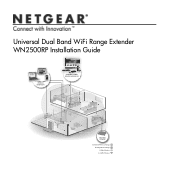
Universal Dual Band WiFi Range Extender WN2500RP Installation Guide
2.4 AND 5 GHz WIRELESS
EXTENSION
CONNECT WIRED DEVICES WIRELESSLY
EXISTING ROUTER
Extended Wireless Range Existing Router Range 5 GHz Wireless 2.4 GHz Wireless
WN2500RP Installation Guide (PDF) - Page 3
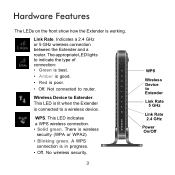
... is working. Indicates a 2.4 GHz or 5 GHz wireless connection between the Extender and a router. No wireless security.
3
WPS
Wireless Device to a wireless device. Hardware Features
The LEDs on the front show how the Extender is in progress. • Off. The appropriate LED lights to Extender. Wireless Device to indicate the type of connection: • Green is best. • Amber is...
WN2500RP Installation Guide (PDF) - Page 4
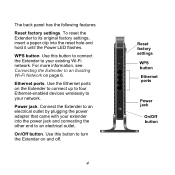
... the reset hole and hold it until the Power LED flashes. Use the Ethernet ports on the Extender to connect up to four Ethernet-enabled devices wirelessly to turn the Extender on page 6.
The back panel has the following features:
Reset factory settings. Ethernet ports. Connect the Extender to an electrical outlet. For more information, see Connecting...
WN2500RP Installation Guide (PDF) - Page 5
...
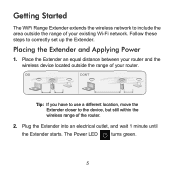
The WiFi Range Extender extends the wireless network to correctly set up the Extender. Follow these steps to include the area outside the range of your existing Wi-Fi network. Place the Extender an equal distance between your router and the wireless device located outside the range of the router.
2. DO
DON'T
Tip: If you have to use a different location...
WN2500RP Installation Guide (PDF) - Page 6
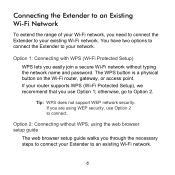
... Wi-Fi Network
To extend the range of your Wi-Fi network, you are using the web browser setup guide
The web browser setup guide walks you through the necessary steps to connect your network. Tip: WPS does not support WEP network security. The WPS button is a physical button on the Wi-Fi router, gateway, or access point...
WN2500RP Installation Guide (PDF) - Page 7
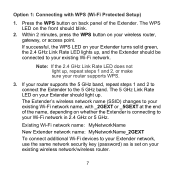
... the 5 GHz band. If your Extender should light up , and the Extender should blink.
2. The Extender's wireless network name (SSID) changes to your existing wireless network/wireless router.
7 Press the WPS button on the front should be connected to your existing Wi-Fi network name, with WPS (Wi-Fi Protected Setup)
1. If successful, the WPS LED on your existing Wi-Fi...
WN2500RP Installation Guide (PDF) - Page 8
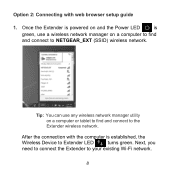
... to the Extender wireless network.
Option 2: Connecting with the computer is
green, use any wireless network manager utility on a computer to find and connect to NETGEAR_EXT (SSID) wireless network. Once the Extender is powered on and the Power LED
is established, the
Wireless Device to your existing Wi-Fi network.
8
After the connection with web browser setup guide
1.
WN2500RP Installation Guide (PDF) - Page 10
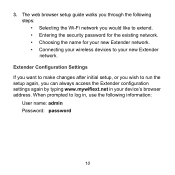
...; Connecting your wireless devices to log in, use the following steps: • Selecting the Wi-Fi network you can always access the Extender configuration settings again by typing www.mywifiext.net in your new Extender network. The web browser setup guide walks you through the following information:
User name: admin Password: password
10
When prompted to your device's browser address.
WN2500RP Installation Guide (PDF) - Page 11
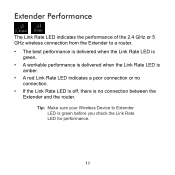
... you check the Link Rate LED for performance.
11 Tip: Make sure your Wireless Device to a router. • The best performance is delivered when the Link Rate LED is
green. • A workable performance is delivered when the Link Rate LED is
amber. • A red Link Rate LED indicates a poor connection or no connection between the
Extender and the...
WN2500RP Installation Guide (PDF) - Page 12
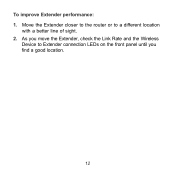
As you move the Extender, check the Link Rate and the Wireless
Device to a different location
with a better line of sight. 2. To improve Extender performance: 1. Move the Extender closer to the router or to Extender connection LEDs on the front panel until you find a good location.
12
WN2500RP Installation Guide (PDF) - Page 13
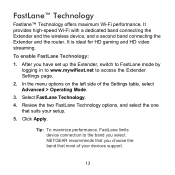
... and the wireless device, and a second band connecting the Extender and the router. Select FastLane Technology. 4.
Review the two FastLane Technology options, and select the one
that most of the Settings table, select Advanced > Operating Mode.
3. Tip: To maximize performance, FastLane limits device connection to access the Extender Settings page.
2.
NETGEAR recommends that...
WN2500RP Installation Guide (PDF) - Page 14
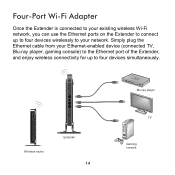
..., you can use the Ethernet ports on the Extender to connect up to your Ethernet-enabled device (connected TV, Blu-ray player, gaming console) to the Ethernet port of the Extender, and enjoy wireless connectivity for up to four devices wirelessly to four devices simultaneously. Simply plug the Ethernet cable from your network. Wireless router
Extender
14
Blu...
WN2500RP Installation Guide (PDF) - Page 15
When to Use the Extender Wireless Network
NETGEAR recommends that you cannot connect from the original wireless router network. If you connect to the Extender wireless network only when a PC or wireless device is in a "dead zone" where the network connection to the device.
15 If, after you try several locations, the device cannot connect to the Extender, move the Extender closer...
WN2500RP Installation Guide (PDF) - Page 16
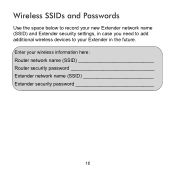
Wireless SSIDs and Passwords
Use the space below to record your new Extender network name (SSID) and Extender security settings, in case you need to add additional wireless devices to your wireless information here: Router network name (SSID Router security password Extender network name (SSID Extender security password
16 Enter your Extender in the future.
WN2500RP Installation Guide (PDF) - Page 17
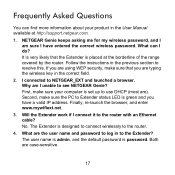
... connect wirelessly to NETGEAR_EXT and launched a browser. Will the Extender work if I connected to the router.
4. It is set up to Extender status LED is placed at http://support.netgear.com.
1. First, make sure your product in the correct field.
2. No. What are using WEP security, make sure the PC to use DHCP (most are). The Extender is password. Follow the instructions in...
Netgear WN2500RP Reviews
We have not received any reviews for Netgear yet.