
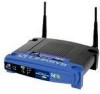
Linksys WAP54G Support Question
Linksys WAP54G Support Question
Find answers below for this question about Linksys WAP54G - Wireless-G Access Point.Need a Linksys WAP54G manual? We have 1 online manual for this item!
Question posted by filzoni on December 31st, 2009
Win7, 651 Error
update firmware for linksys 54G has been suggested as a possible solution
Current Answers
Related Linksys WAP54G Manual Pages
User Guide - Page 2
...linksys.com
Linksys International www.linksys.com/international
Glossary
www.linksys.com/glossary
Network Security www.linksys.com/security
Copyright and Trademarks
Linksys, Cisco and the Cisco Logo are trademarks or registered trademarks of the web address.
WEB: This globe icon indicates a noteworthy website address or e-mail address.
All rights reserved. Wireless-G Access Point...
User Guide - Page 3
...Chapter 2: Using the Linksys Wireless Guard Service
6
Client Software Installation 6 Network Access 8 Your Account 8
Chapter 3: Configuring the Wireless-G Access Point
12
How to Access the Web-Based ... > Factory Defaults 21 The Administration Tab > Firmware Upgrade 21 The Status Tab > Local Network 21 The Status Tab > Wireless Network 22
Appendix A: Troubleshooting
23
Appendix B: ...
User Guide - Page 4
Table of Contents
Electric and Electronic Equipment (WEEE 29
Appendix E: Software License Agreement
33
Software in Linksys Products 33 Software Licenses 33
Wireless-G Access Point
iii
User Guide - Page 5
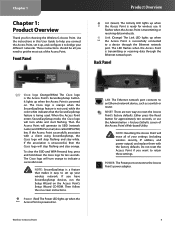
... network device, such as a switch or router. Link (Orange) The Link LED lights up when the Power Access Point is the Access Point's SecureEasySetup button. Back Panel
Cisco logo (Orange/White) The Cisco logo is powered on . Wireless-G Access Point
LAN The Ethernet network port connects to retain these settings. POWER The Power port connects to reset...
User Guide - Page 6
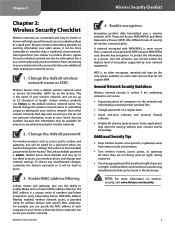
... these defaults and may be asked for anyone to -peer). Enable MAC address filtering
Linksys routers and gateways give you will be hard to install, so homes with specific MAC addresses.
Change the default password
For wireless products such as your network secure.
1. Wireless-G Access Point
Wireless Security Checklist
4.
WEP is a unique series of security for...
User Guide - Page 7
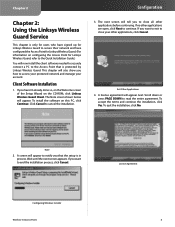
.... License Agreement
Configuring Windows Installer
Wireless-G Access Point
6 Chapter 2
Chapter 2: Using the Linksys Wireless Guard Service
This chapter is only for users who have signed up for Linksys Wireless Guard to secure their network and have configured the Access Point for Linksys Wireless Guard. (For information on configuring the Access Point for Linksys Wireless Guard, refer to the...
User Guide - Page 8
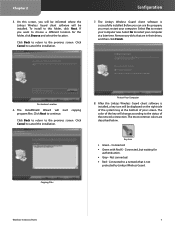
...choose a different location for
authentication. •• Gray - After the Linksys Wireless Guard client software is not
protected by Linksys Wireless Guard. Copying Files
Wireless-G Access Point
7 Connected to restart your computer.
Select Yes to a network that are described below. The Linksys Wireless Guard client software is successfully installed. Remove any disks that is...
User Guide - Page 9
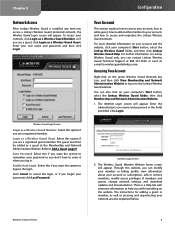
... network settings, and download updates and documentation. The Wireless Guard Member Website home screen will appear. Through this if you want the system to enter it when you log in. There is installed, any time you can contact Linksys Wireless Guard Technical Support at the Membership and Network Administration Website. Wireless-G Access Point
8 Login as securing and...
User Guide - Page 10
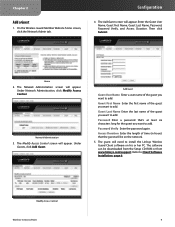
The Network Administration screen will appear.
The software can be on his or her PC. Refer to install the Linksys Wireless Guard Client software on the network.
5.
Network Administration
3. Modify Access Control
Wireless-G Access Point
9
The Modify Access Control screen will appear. Add Guest
Guest User Name Enter a user name of the guest you want to add. ...
User Guide - Page 11
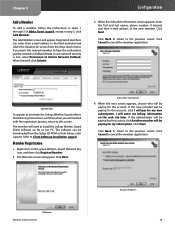
...the next screen appears, choose who will need to install the Linksys Wireless Guard Client software on his or her PC. Welcome Wireless-G Access Point
Account Finances 10 When the Subscriber information screen appears, enter ... address in the field provided and select the duration for Linksys Wireless Guard, refer to the following instructions, and then when you want this screen. Click ...
User Guide - Page 12
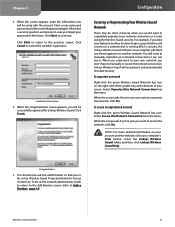
... so it and automatically reinstate security. Linksys Wireless Guard will need to Add a Member, page 10). Select Secure this Network Connection from the menu. You should now ask the administrator to add you take your laptop to another network. Wireless-G Access Point
11 Configuration
Securing or Unprotecting Your Wireless Guard Network
There may be some instances...
User Guide - Page 13
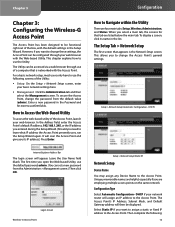
... the User Name field blank. To display a screen, click its IP address.) Press Enter. Chapter 3
Chapter 3: Configuring the Wireless-G Access Point
The Access Point has been designed to be functional right out of the Access Point, launch your web browser. For a basic network setup, most users only have to use the default password, admin. (You can be...
User Guide - Page 14
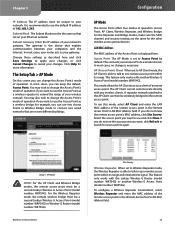
...The AP Client cannot communicate directly with another Wireless-G Access Point (model number: WAP54G). For the Wireless Repeater mode, the remote wireless bridge must be a second Linksys Wireless-G Access Point (model number: WAP54G). The gateway is recommended to act as a wireless bridge; Click Help for the other wireless access points/devices. This mode allows the AP Client to...
User Guide - Page 15
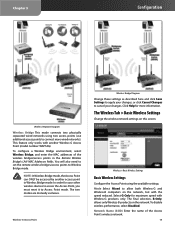
... must reset it to connect more information. The Wireless Tab > Basic Wireless Settings
Change the wireless network settings on the network.
The two modes are mutually exclusive. Mode Select Mixed to Wireless Bridge mode. NOTE: In Wireless Bridge mode, the Access Point can ONLY be accessed by another Wireless-G Access Point (model number: WAP54G). In order for your changes. Select G-Only...
User Guide - Page 16
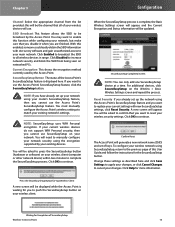
... click SecureEasySetup on networked PCs.
A new screen will need to the previous page of the Access Point's SecureEasySetup feature is complete, the Basic Wireless Settings screen will appear, and the Current Encryption and Status information will be updated. Current Encryption This shows the encryption method currently used by your network security using SecureEasySetup, return...
User Guide - Page 17
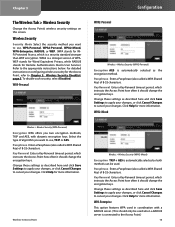
... AES is automatically selected so both methods can be used in coordination with dynamic encryption keys.
WPA2-Mixed
Wireless > Wireless Security (WPA-Personal)
Encryption WPA offers you want to cancel your changes. Wireless-G Access Point
Wireless > Wireless Security (WPA2-Mixed)
Encryption TKIP + AES is automatically selected as described here and click Save Settings to apply...
User Guide - Page 18
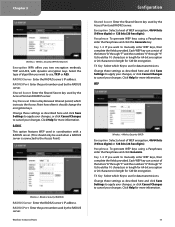
... here and click Save Settings to apply your changes. RADIUS Port Enter the port number used by the Access Point and RADIUS server. RADIUS
This option features WEP used in length for data transmissions. Wireless-G Access Point
Configuration
Shared Secret Enter the Shared Secret key used by the RADIUS server. Click Help for data transmissions...
User Guide - Page 20
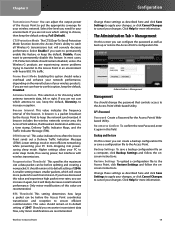
... permanently disable this value and experience high packet error rates, you can create a backup configuration file or save a backup configuration file on the manufacturer of the beacon. CTS Protection Mode The CTS (Clear-To-Send) Protection Mode function boosts the Access Point's ability to catch all Wireless-G transmissions but interferes with heavy 802.11b...
User Guide - Page 22
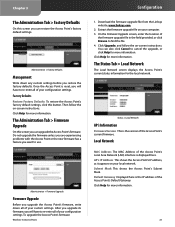
...website, www.linksys.com.
2. Click Upgrade, and follow the on -screen instructions.
Click Help for more information.
Then follow the on -screen instructions. Do not upgrade the firmware unless you are experiencing problems with the Access Point or the new firmware has a feature you can upgrade the Access Point's firmware. To upgrade the Access Point's firmware:
Wireless-G Access Point...
User Guide - Page 26
...OR INABILITY TO USE THE PRODUCT (INCLUDING ANY SOFTWARE), EVEN IF LINKSYS HAS BEEN ADVISED OF THE POSSIBILITY OF SUCH DAMAGES. Products received without a RMA number and dated... use with non‑Linksys products, (d) the product has not been installed, operated, repaired, or maintained in accordance with third party software or
Wireless-G Access Point
Warranty Information
service offerings....
Linksys Knowledge Base Results
We have determined that the information below may contain an answer to this question. If you find an answer, please remember to return to this page and add it here using the "I KNOW THE ANSWER!" button above. It's that easy to earn points!-
Encountering Intermittent Wireless Connection Using a Linksys Access Point
... sets, microwaves, radios, etc. Physical obstructions : Your access point or wireless computers may be placed in. here . If the wireless connection remains unstable after performing the steps above, upgrade the access point's firmware. Linksys suggests changing the SSID (network name) and the Wireless Channel on the same frequency as your cordless telephone system (or... -
Setting up a wireless bridge with WAP54G Access Points
... the full string with each other Linksys WAP54Gs or WAP11s Access Point models. Setting up the Access Point #1 (WAP54G #1): For this section, please have Access Point #2 (WAP54G #2) unplugged and not present on the WAP54GR17;s. Setting up a wireless bridge connects two physically separated wired networks using two WAP54G units? X to each Access Point has its own unique IP address... -
Upgrading the Linksys Wireless-G Access Point's Firmware
... process, follow the steps below . here. 4157 02/24/2009 06:05 PM Upgrading the Linksys Wireless-G Access Point's Firmware How do I upgrade the Linksys Access Point's firmware? If your computer is selected, click : In this example, we used WAP54G v.3. To download WinZip®, visit . The filename may see a "Pop-up blocked" message in unzipping features of your...
Similar Questions

Linksys Access Point Wap54g Goes Down When Not In Use
(Posted by chr4lisa 9 years ago)

How To Reset A Cisco Wireless-n Access Point Wap610n
(Posted by plrosmrss 10 years ago)

Missed Setup Wizard Cd-rom For My Wap54g Access Point.
Hello, can I download the CD-data to get my WAP54g started again?
Hello, can I download the CD-data to get my WAP54g started again?
(Posted by regi09 12 years ago)

How To Get Web Access To The Link Sys Wap 610n Wifi Access Point?
How to get web access to the Link Sys WAP 610N wifi access point, after configuring these access poi...
How to get web access to the Link Sys WAP 610N wifi access point, after configuring these access poi...
(Posted by imtiazpasha 12 years ago)
How Can I Encrypt My Wireless-g Access Point Model Wap 54g V.2?
I have a PC LAN ethernet cable connected to one port on a Comtrend Wireless ADSL-2 + Router. The ...
I have a PC LAN ethernet cable connected to one port on a Comtrend Wireless ADSL-2 + Router. The ...
(Posted by jleach 13 years ago)