
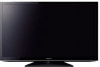
Safety and Regulatory Booklet
Page 3
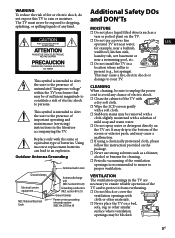
...dry soft cloth. ☐ Wipe the LCD screen gently This symbol is recommended to ensure ...removed with a cloth slightly moistened with cloth or other materials. ☐ Never place the TV on the package. ☐ Never use a power line operated TV set...screen or exterior parts, and may cause a Replace only with a soft cloth. ☐ Stubborn stains may cause a fire, electric shock or This symbol is present (e.g., hot springs). This may be sure to unplug the power cord to avoid any kind. with the same or equivalent type of important operating and maintenance (servicing) instructions...
...dry soft cloth. ☐ Wipe the LCD screen gently This symbol is recommended to ensure ...removed with a cloth slightly moistened with cloth or other materials. ☐ Never place the TV on the package. ☐ Never use a power line operated TV set...screen or exterior parts, and may cause a Replace only with a soft cloth. ☐ Stubborn stains may cause a fire, electric shock or This symbol is present (e.g., hot springs). This may be sure to unplug the power cord to avoid any kind. with the same or equivalent type of important operating and maintenance (servicing) instructions...
Warranty
Page 1
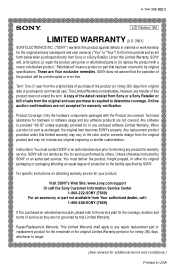
... uninterrupted or error-free. Repair/Replacement Warranty: This Limited Warranty shall apply to determine coverage. A copy of the dated receipt from Sony or a Sony Retailer or bill of the original Limited Warranty period or for ninety (90) days, whichever is provided "AS IS" unless expressly provided for warranty verification. Unless otherwise instructed by SONY or an authorized servicer, You must contact SONY or an...
... uninterrupted or error-free. Repair/Replacement Warranty: This Limited Warranty shall apply to determine coverage. A copy of the dated receipt from Sony or a Sony Retailer or bill of the original Limited Warranty period or for ninety (90) days, whichever is provided "AS IS" unless expressly provided for warranty verification. Unless otherwise instructed by SONY or an authorized servicer, You must contact SONY or an...
Warranty
Page 2
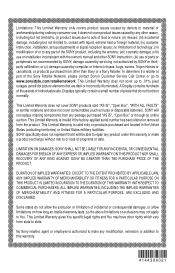
... foreign material; (iv) customer instruction, installation, set up to .01% pixel outages (small dot picture elements that it does not cover product issues caused by any part of parts or peripherals not recommended by SONY; or (x) damage caused by SONY or thirdparty calibration; SONY specifically does not represent that are dark or incorrectly illuminated). This Limited Warranty gives You specific legal rights and You...
... foreign material; (iv) customer instruction, installation, set up to .01% pixel outages (small dot picture elements that it does not cover product issues caused by any part of parts or peripherals not recommended by SONY; or (x) damage caused by SONY or thirdparty calibration; SONY specifically does not represent that are dark or incorrectly illuminated). This Limited Warranty gives You specific legal rights and You...

Child Safety: It Makes A Difference How and Where You Use Your Flat Panel Display
Page 1
.... TUNE INTO SAFETY • One size does NOT fit all cords and cables connected to be heavy. WALL MOUNTING: IF YOU DECIDE TO WALL MOUNT YOUR FLAT PANEL DISPLAY, ALWAYS: • Use a mount that has been recommended by the display manufacturer and/or listed by the display and wall mount manufacturers. • If you have any doubts about your ability to safely install your flat panel display, contact your purchase! Convener Electrwirs...
.... TUNE INTO SAFETY • One size does NOT fit all cords and cables connected to be heavy. WALL MOUNTING: IF YOU DECIDE TO WALL MOUNT YOUR FLAT PANEL DISPLAY, ALWAYS: • Use a mount that has been recommended by the display manufacturer and/or listed by the display and wall mount manufacturers. • If you have any doubts about your ability to safely install your flat panel display, contact your purchase! Convener Electrwirs...
Operating Instructions
Page 3
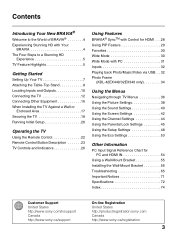
... Remote Control 22 Remote Control Button Description 23 TV Controls and Indicators 26 Using Features BRAVIA® SyncTM with Control for HDMI . . .28 Using PIP Feature 29 Favorites 30 Wide Mode 30 Wide Mode with PC 31 Inputs 32 Playing back Photo/Music/Video via USB. . . 32 Photo Frame (KDL-42EX440/32EX340 only 34 Using the Menus Navigating through TV Menus 36 Using the Picture Settings 38 Using the Sound Settings 40 Using the Screen Settings 42 Using the Channel Settings 44 Using the Parental Lock Settings...
... Remote Control 22 Remote Control Button Description 23 TV Controls and Indicators 26 Using Features BRAVIA® SyncTM with Control for HDMI . . .28 Using PIP Feature 29 Favorites 30 Wide Mode 30 Wide Mode with PC 31 Inputs 32 Playing back Photo/Music/Video via USB. . . 32 Photo Frame (KDL-42EX440/32EX340 only 34 Using the Menus Navigating through TV Menus 36 Using the Picture Settings 38 Using the Sound Settings 40 Using the Screen Settings 42 Using the Channel Settings 44 Using the Parental Lock Settings...
Operating Instructions
Page 4
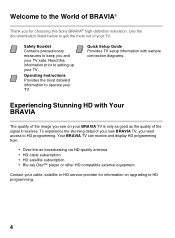
... the signal it receives. Read this Sony BRAVIA® high-definition television. Your BRAVIA TV can receive and display HD programming from: • Over-the-air broadcasting via HD-quality antenna • HD cable subscription • HD satellite subscription • Blu-ray Disc™ player or other HD compatible external equipment Contact your cable, satellite or HD service provider for choosing this information prior to HD programming. 4 Operating Instructions...
... the signal it receives. Read this Sony BRAVIA® high-definition television. Your BRAVIA TV can receive and display HD programming from: • Over-the-air broadcasting via HD-quality antenna • HD cable subscription • HD satellite subscription • Blu-ray Disc™ player or other HD compatible external equipment Contact your cable, satellite or HD service provider for choosing this information prior to HD programming. 4 Operating Instructions...
Operating Instructions
Page 10
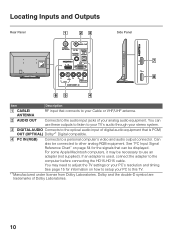
... for the signals that can use an adapter (not supplied). See "PC Input Signal Reference Chart" on page 54 for information on how to setup your PC's resolution and timing. You may be connected to other analog RGB equipment. Locating Inputs and Outputs Rear Panel Side Panel Item Description 1 CABLE/ ANTENNA RF input that connects to your Cable or VHF/UHF antenna. 2 AUDIO OUT Connects to the audio input jacks of your stereo system. 3 DIGITAL AUDIO Connects to the optical audio input of...
... for the signals that can use an adapter (not supplied). See "PC Input Signal Reference Chart" on page 54 for information on how to setup your PC's resolution and timing. You may be connected to other analog RGB equipment. Locating Inputs and Outputs Rear Panel Side Panel Item Description 1 CABLE/ ANTENNA RF input that connects to your Cable or VHF/UHF antenna. 2 AUDIO OUT Connects to the audio input jacks of your stereo system. 3 DIGITAL AUDIO Connects to the optical audio input of...

Operating Instructions
Page 11
...-digital audio/video interface between the VIDEO and COMPONENT when VIDEO or COMPONENT is available only with HDMI connection. 11 Use the HDMI IN 1 port when connecting DVI equipment. For component connection, use only an HDMI cable that bears the HDMI logo. Connects to USB equipment to access photo, music, and video files. • An HDMI or Component video (YPBPR) connection is required to auto detection, press HOME, select Settings, and then select the Setup settings. To set -top box, DVD player, and A/V receiver. Select the Video/Component...
...-digital audio/video interface between the VIDEO and COMPONENT when VIDEO or COMPONENT is available only with HDMI connection. 11 Use the HDMI IN 1 port when connecting DVI equipment. For component connection, use only an HDMI cable that bears the HDMI logo. Connects to USB equipment to access photo, music, and video files. • An HDMI or Component video (YPBPR) connection is required to auto detection, press HOME, select Settings, and then select the Setup settings. To set -top box, DVD player, and A/V receiver. Select the Video/Component...

Operating Instructions
Page 37
... settings to output the sound to them. You can select may vary. Channel: navigate your TV settings. Parental Lock: set the password and limit access to power consumption. Screen: adjust the size and shape of the images you can also block channels and inputs. Eco: changes the settings related to programming based on the screen. Settings The Settings icon contains all of the necessary configurations to customize your favorite channels and inputs and select the signal type...
... settings to output the sound to them. You can select may vary. Channel: navigate your TV settings. Parental Lock: set the password and limit access to power consumption. Screen: adjust the size and shape of the images you can also block channels and inputs. Eco: changes the settings related to programming based on the screen. Settings The Settings icon contains all of the necessary configurations to customize your favorite channels and inputs and select the signal type...
Operating Instructions
Page 50
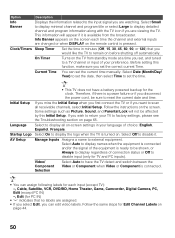
... want to scan all on . Video/ Component Selection Select Auto to have a battery powered backup for Edit Channel Labels on the TV from the broadcaster. Select Date (Month/Day/ Year) to set the date, then select Time to set , and tuned to a TV channel or input of choice: English, Español, Français. Some settings such as Picture, Sound, and Parental Lock will appear...
... want to scan all on . Video/ Component Selection Select Auto to have a battery powered backup for Edit Channel Labels on the TV from the broadcaster. Select Date (Month/Day/ Year) to set the date, then select Time to set , and tuned to a TV channel or input of choice: English, Español, Français. Some settings such as Picture, Sound, and Parental Lock will appear...
Operating Instructions
Page 65
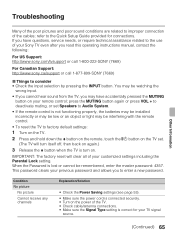
...; Check cable/antenna connections. • Make sure the Signal Type setting is not functioning properly, the batteries may be installed incorrectly or may be low or an object or light may be interfering with the remote control. • To reset the TV to the Quick Setup Guide provided for your TV signal source. (Continued) 65 Condition No picture No picture Cannot receive any channels Explanation/Solution • Check the Power Saving settings...
...; Check cable/antenna connections. • Make sure the Signal Type setting is not functioning properly, the batteries may be installed incorrectly or may be low or an object or light may be interfering with the remote control. • To reset the TV to the Quick Setup Guide provided for your TV signal source. (Continued) 65 Condition No picture No picture Cannot receive any channels Explanation/Solution • Check the Power Saving settings...
Operating Instructions
Page 66
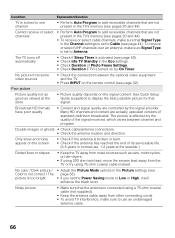
... some video sources • Check the connection between channel and program. Poor picture Picture quality not as good as viewed at the seaside.) Dotted lines or stripes • Keep the TV away from noise sources such as cars, motorcycles, or hair-dryers. • If using 75-ohm coaxial cable instead. See Quick Setup Guide (supplied) to use , 1-2 years at the store • Picture quality depends on the remote control...
... some video sources • Check the connection between channel and program. Poor picture Picture quality not as good as viewed at the seaside.) Dotted lines or stripes • Keep the TV away from noise sources such as cars, motorcycles, or hair-dryers. • If using 75-ohm coaxial cable instead. See Quick Setup Guide (supplied) to use , 1-2 years at the store • Picture quality depends on the remote control...

Operating Instructions
Page 67
... Sound settings (see page 51). Second A/V receiver is set to Audio System, sound is connected using a 75-ohm coaxial cable (not supplied). • Keep the antenna cable away from the TV's speakers regardless of the TV's volume control. • When using HDMI input with the BRAVIA Sync and not listed on both the TV and the optional device compatible with Alternate Audio, the broadcaster may not be used with Super Audio CD or DVD-Audio, DIGITAL AUDIO OUT (OPTICAL...
... Sound settings (see page 51). Second A/V receiver is set to Audio System, sound is connected using a 75-ohm coaxial cable (not supplied). • Keep the antenna cable away from the TV's speakers regardless of the TV's volume control. • When using HDMI input with the BRAVIA Sync and not listed on both the TV and the optional device compatible with Alternate Audio, the broadcaster may not be used with Super Audio CD or DVD-Audio, DIGITAL AUDIO OUT (OPTICAL...
Operating Instructions
Page 69
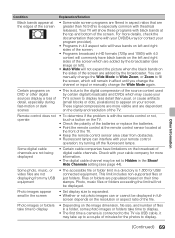
... remote control operation; Some digital cable channels are populated based on their time stamps. Files or folders are not being displayed • Certain cable companies have limitations on the broadcast of digital cable channels. Photo images appear small in the screen • Set display size to fill the screen, which will remain in full- Your TV will not be displayed in affect until you change the channel or input or manually change the Wide Mode...
... remote control operation; Some digital cable channels are populated based on their time stamps. Files or folders are not being displayed • Certain cable companies have limitations on the broadcast of digital cable channels. Photo images appear small in the screen • Set display size to fill the screen, which will remain in full- Your TV will not be displayed in affect until you change the channel or input or manually change the Wide Mode...
Operating Instructions
Page 70
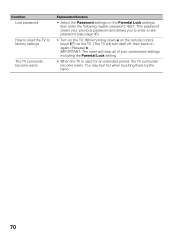
... is used for an extended period, the TV surrounds become warm Explanation/Solution • Select the Password settings on the Parental Lock settings, then enter the following master password: 4357. IMPORTANT: The reset will turn itself off, then back on again.) Release V. You may feel hot when touching there by the hand. 70 While holding down V on the remote control, touch...
... is used for an extended period, the TV surrounds become warm Explanation/Solution • Select the Password settings on the Parental Lock settings, then enter the following master password: 4357. IMPORTANT: The reset will turn itself off, then back on again.) Release V. You may feel hot when touching there by the hand. 70 While holding down V on the remote control, touch...
Operating Instructions
Page 74
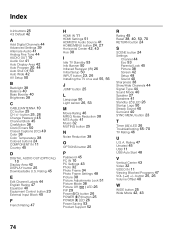
... Picture Adjustments Lock 51 Picture Mode 38 Picture Off ( ) LED 26 PIP 29 Power ("/1) button 26 POWER ("/1) button 25 POWER (") LED 26 Power Saving 53 Product Support 52 R Rating 45 Reset 38, 40, 53, 70 RETURN button 24 S SCENE button 24 Settings Channel 44 Eco 53 Parental Lock 45 Picture 38 Screen 42 Setup 48 Sound 40 Sharpness 38 Show/Hide Channels 44 Signal Type 44 Sound Mode 40 Speaker 27 Speakers 41 Standby (1) LED 26 Startup Logo 50 Steady Sound 40 Surround 40 SYNC MENU button 23 T Timer ( ) LED 26 Troubleshooting...
... Picture Adjustments Lock 51 Picture Mode 38 Picture Off ( ) LED 26 PIP 29 Power ("/1) button 26 POWER ("/1) button 25 POWER (") LED 26 Power Saving 53 Product Support 52 R Rating 45 Reset 38, 40, 53, 70 RETURN button 24 S SCENE button 24 Settings Channel 44 Eco 53 Parental Lock 45 Picture 38 Screen 42 Setup 48 Sound 40 Sharpness 38 Show/Hide Channels 44 Signal Type 44 Sound Mode 40 Speaker 27 Speakers 41 Standby (1) LED 26 Startup Logo 50 Steady Sound 40 Surround 40 SYNC MENU button 23 T Timer ( ) LED 26 Troubleshooting...
Quick Setup Guide
Page 1
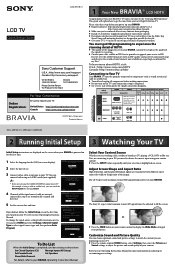
... items: Set Closed Captions (CC) Manage Inputs (AV Setup) Set Parental Lock Set Speakers Show/Hide Channels For details, refer to your PC, you are displayed on the screen when your Operating Instructions Manual. or connecting to your BRAVIA Operating Instructions Manual. ■ Press the WIDE button on your new High Definition TV. If you did not follow the Initial Setup screen the first time you see on screen display). 2 Select the type of the signal source (cable or antenna) connected in Mexico...
... items: Set Closed Captions (CC) Manage Inputs (AV Setup) Set Parental Lock Set Speakers Show/Hide Channels For details, refer to your PC, you are displayed on the screen when your Operating Instructions Manual. or connecting to your BRAVIA Operating Instructions Manual. ■ Press the WIDE button on your new High Definition TV. If you did not follow the Initial Setup screen the first time you see on screen display). 2 Select the type of the signal source (cable or antenna) connected in Mexico...
Quick Setup Guide
Page 2
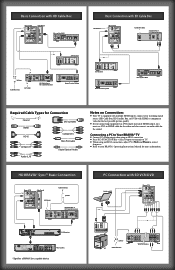
... signal source (HD Cable Box, HD Satellite Box, or DVD) with HDMI or component video for the best possible picture quality. ■ If your BRAVIA® Operating Instructions Manual for Ntheostouensd.on Connection: ■ Your TV is equipped with multiple HDMI inputs; Basic Connection with HD Cable Box Rear of TV Side Panel Blu-ray Disc/DVD Basic Connection with SD Cable Box HD Antenna Rear of TV Cable/SAT (dish) SD Cable Box or SD Satellite Receiver or A/V Receiver Splitter Cable/Antenna SAT (dish) HD Cable Box...
... signal source (HD Cable Box, HD Satellite Box, or DVD) with HDMI or component video for the best possible picture quality. ■ If your BRAVIA® Operating Instructions Manual for Ntheostouensd.on Connection: ■ Your TV is equipped with multiple HDMI inputs; Basic Connection with HD Cable Box Rear of TV Side Panel Blu-ray Disc/DVD Basic Connection with SD Cable Box HD Antenna Rear of TV Cable/SAT (dish) SD Cable Box or SD Satellite Receiver or A/V Receiver Splitter Cable/Antenna SAT (dish) HD Cable Box...
Marketing Specifications
Page 1
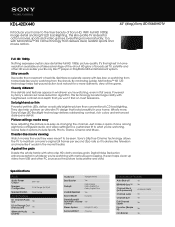
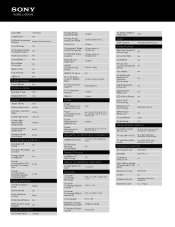
... highest in the movie theater. Specifications Audio Audio Power Output 6W + 6W Speaker Configuration 2 Full Range (4x10) x2 Speaker Position Rear Facing Audio Features 5.1 Channel Audio Out Yes 5.1ch Through Out (Handycam) Yes Alternate Audio (Digital) Yes Audio Out Variable/Fixed Bass Booster Yes Dolby® DolbyDigital Dolby Digital Plus Dolby Digital Pulse Invisible Speaker Yes Sound Mode Dynamic SteadySound® Automatic Volume Yes Control Stereo System MTS(AUTO SAP) Surround Effect Cinema...
... highest in the movie theater. Specifications Audio Audio Power Output 6W + 6W Speaker Configuration 2 Full Range (4x10) x2 Speaker Position Rear Facing Audio Features 5.1 Channel Audio Out Yes 5.1ch Through Out (Handycam) Yes Alternate Audio (Digital) Yes Audio Out Variable/Fixed Bass Booster Yes Dolby® DolbyDigital Dolby Digital Plus Dolby Digital Pulse Invisible Speaker Yes Sound Mode Dynamic SteadySound® Automatic Volume Yes Control Stereo System MTS(AUTO SAP) Surround Effect Cinema...
Marketing Specifications
Page 2
... w/ Input(s) Component) Digital Audio Output(s) 1 (Rear) HDMI™ Connection(s) (Total) 2(1Rear, 1Side) HDMI™ PC Input Yes PC In (D-Sub) + Audio In (Stereo Mini) 1 (Rear Hybrid w/HDMI) PC Input Format Support 640x480@60Hz RF Connection Input(s) 1 (Rear) USB 2.0 1 (Side) Power Power Consumption (in H x D) ((983x643x233 mm) Supplied Accessories AC Power Cord Attached Batteries Type AA x2 Operating Instructions US Quick Setup Guide / Supplement CUE US (GA) Remote Control RM-YD080 Screws Yes Table Top Stand separate (assembly required) Warranty Card...
... w/ Input(s) Component) Digital Audio Output(s) 1 (Rear) HDMI™ Connection(s) (Total) 2(1Rear, 1Side) HDMI™ PC Input Yes PC In (D-Sub) + Audio In (Stereo Mini) 1 (Rear Hybrid w/HDMI) PC Input Format Support 640x480@60Hz RF Connection Input(s) 1 (Rear) USB 2.0 1 (Side) Power Power Consumption (in H x D) ((983x643x233 mm) Supplied Accessories AC Power Cord Attached Batteries Type AA x2 Operating Instructions US Quick Setup Guide / Supplement CUE US (GA) Remote Control RM-YD080 Screws Yes Table Top Stand separate (assembly required) Warranty Card...